
🪙 How to Send Bitcoin with Cash App (US) — On-Chain Only
This guide explains how you can send Bitcoin (BTC) to MyPvM using a verified US Cash App account.
⚠️ It covers on-chain Bitcoin transactions only — not Lightning.
🔒 Requirements
Before you can send BTC, make sure you have:
US residency
A verified Cash App account
Bitcoin enabled under Settings
Completed ID verification (KYC)
BTC in your Cash App balance
🔁 Step-by-Step: How to Send BTC via Cash App
1. Buy Bitcoin (if needed)
Open Cash App
Tap the Bitcoin (₿) tab
Select Buy
Enter amount and confirm
ℹ️ Cash App charges a small spread/service fee, but no mining fee yet.
2. Enable Bitcoin Withdrawals
Go to Cash App → Bitcoin → Enable Withdrawals
Complete KYC (photo ID + selfie)
✅ Once approved, the Send Bitcoin option unlocks.
3. Send BTC to MyPvM
Tap Bitcoin → Send Bitcoin
Paste our official Bitcoin address:
bc1q23k0sfv47keglp7wwgpe3pu9j86ql50rvdt703
Or simply scan the QR code:
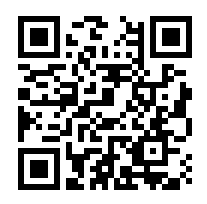
⚠️ Must be a Bitcoin (BTC) on-chain address.
❌ Do not send to Ethereum, BEP20, or other networks.
Enter the amount in BTC or USD
Choose transfer speed:
Standard = cheaper or zero fee, slower
Priority = higher fee, faster confirmation
Confirm and send
✅ Quick Summary Table
Step | Action |
|---|---|
1 | Buy BTC on Cash App |
2 | Enable BTC withdrawals (KYC required) |
3 | Enter MyPvM BTC address or scan QR |
4 | Send with Standard speed to reduce fees |
⚠️ Important Reminders
This is on-chain BTC only — not Lightning Network
Always double-check the wallet address → BTC transactions are irreversible
Avoid sending to:
Smart contracts
Exchange deposit addresses for unsupported chains
Custodial wallets that don’t accept on-chain BTC